What are you doing up at this hour?
07/31/08, 2:41
That’s what Toni asked me about 2hrs ago. Followed by:
Me: getting my calendars set up to sync through google
Toni: sounds exciting there
Me:
you have no idea
Toni: lol
Toni: you are an odd one
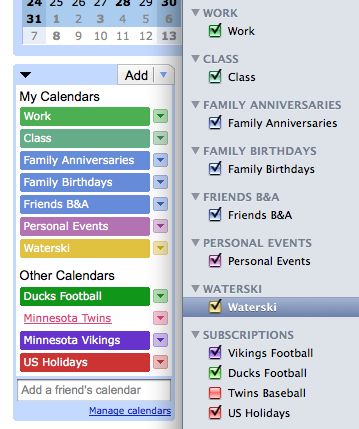
Anyways this is fairly brilliant. Google Calendar is the brains of the operation, where the data is stored and whatnot. Sure I exported most of my calendars straight from iCal, but then I set up the calendars to utilize Google Calendar’s new calDAV service (Google’s instructions). So now I can edit events on my iMac at home, the iMac at work, even on my iPod Touch, and it’ll sync up to the gCloud, and back down to my computers/iPod, and essentially be the same everywhere.
Caveat here is regarding the iPod Touch. I only see the “live” calendars when using Google’s mobile interface, the Apple Calendar interface needs to get plugged in at home to sync. Same with posting, it if i post to Apple Calendar, nothing goes live until I plug & sync at home. And obviously Google Calendar needs to be within earshot of wi-fi access.
This is all acceptable though, wi-fi seems ubiquitous enough for when I’m hopping between computers, and when I’m not (say, when I visit the family cabin in Minnesota), the iPod Touch will be the only device I have for keeping schedules, so it’ll “just work”.
The one thing I don’t understand, is why do each of my Google Calendars need seperate CalDAV accounts in iCal? This is makes it a pain the ass to set up, but after the fact is mainly cosmetic (see image above, and click to enlarge).
Hmm.. ramblomatic blogger? I’m going to bed.
1
10.5 Feature: It’s about time!
10/26/07, 0:50
Thanks Apple for finally listening to my feature request from back on Mac OS X 10.2 “Jaguar”.
That’s right, they’ve finally made the icon grid adjustable. In relation to 10.4 “Tiger,” the widest spread looks to be about 10% wider, and is finely adjustable to what I would consider too close. I appreciate being given the choice.
To set this option, click on the Desktop, and under the View menu, select “Show View Options”.
1
The wait to Leopard….
10/26/07, 0:37
Aka “Nooooooooooooooooooooooooo!!!”
Finally was able to login to the Up-To-Date order tracking system tonight. And to my horror, this is what I saw:

Anyways, I won’t hold my breath. I know I have a license for the software, so I should be able to acquire a copy from work by the weekend. Thanks Apple for not using product activation.
A bit of backstory: I’m part of the Up-to-date program because I picked up a “new” previous generation 24″ iMac at the beginning of the month. The thing is freaking huge, biggest screen in our apartment.
1
Sha-Wing. Sexy mouse.
10/10/06, 15:32
I really am a crappy blogger. Anyhow, this prompted me to post. Nearly 2.5 years after I first read about my dream mouse, I finally have it. Based on my feeling like Wayne from Waynes world looking at the electric guitar, I shall call it “Excallibur”.

Hand candy at it’s finest.
1
The Vicarious MacBook
07/30/06, 16:45
from David’s Blog:
MacBook mission a success
Today I upgraded to a MacBook (2.0 GHz Core Duo with SuperDrive)…..
For some unknown reason, I’ve wanted a MacBook for the last few weeks. *REALLY* wanted. The probelm is I don’t really need it, and can’t exactly afford it. They’re sweet laptops, perfect ratio of size to power (13″ wide screen, 2GHz Core Duo, Superdrive), and not overly priced. Well, a friend of mine picked one, er two of them up yesterday (the first one kernel paniced out of the box, returned it for another, which didn’t). Spent a good chunk of the afternoon watching him set it them up. The thing plays 1080p HD videos beautifully, something my iMac cannot do (though 720p are more than adequate for me). I figured for some reason that if I watch him set his up, it would settle my urge to buy. Mission failed, I want one even more now.
Jealousy ensues…